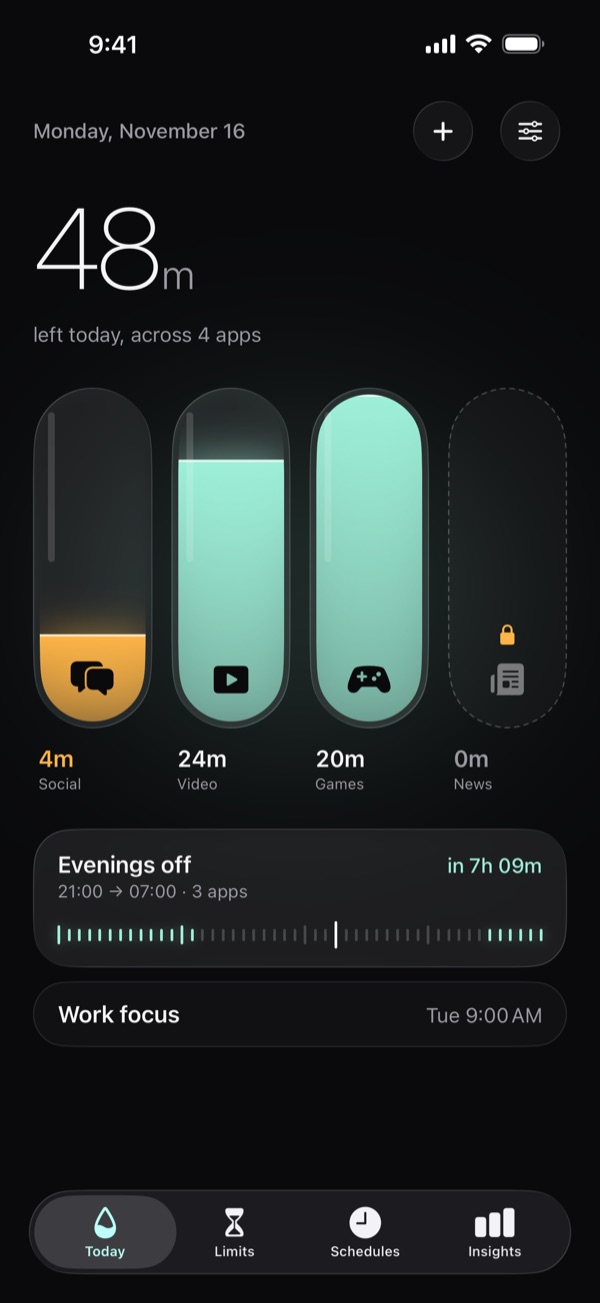
Every app gets a glass.
Give Instagram 15 minutes, TikTok 20, YouTube 45. Watch each glass drain while you scroll. When it’s empty, the app waits until tomorrow – and not even you can change that.
Three steps. One rule.
-
Fill a glass
Pick an app and give it minutes for the day. Drag the ruler and watch the glass fill. A dashed line shows what you use on an average day.
-
Watch it drain
Every minute in the app lowers the level. Two minutes before the end you get a heads-up, so nothing ends mid-sentence.
-
Empty means empty
When the glass runs dry, the app locks until midnight. The limit can’t be raised, paused or deleted until then – not in the app, not in Settings.
Most limits fail the moment you tap “Ignore”. Lowline doesn’t have that button.
And everything around it.
Schedules
Block apps between two times – evenings off, focus mornings – on the days you choose.
Shared glasses
Give Instagram and TikTok one glass together, or a glass each.
Websites too
The same limit covers the website, so Safari isn’t a back door.
One more minute
Up to three extra minutes a day, straight from the block screen. Off inside strict schedules.
Insights
See what was left in each glass, day by day, and where your week went.
Widgets
Your glasses on the Home Screen and Lock Screen, draining in real time.
Your screen time stays on your iPhone.
Lowline works through Apple’s Screen Time. Apple hands it sealed tokens instead of app names, so Lowline can pause an app without ever learning which one it is. No accounts, no servers, no tracking.
Fill your first glass.
On the App Store for iPhone. Requires iOS 26.
Download on the App Store